UNB D2L Brightspace
1. UNB Libraries Course Widget
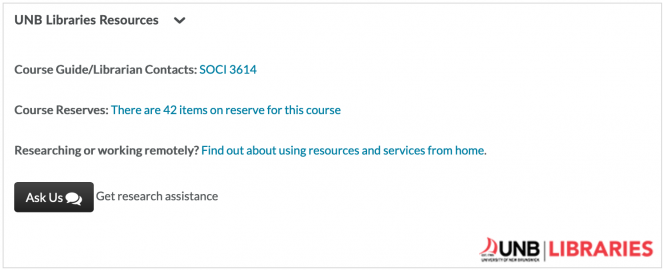
Library resources appear in all D2L Brightspace courses using the default template as a widget or module (see image above) at the bottom of a course page's left column. Here you will find links to:
- Research Guide / Librarian Contacts - A Subject Guide of library resources chosen by your subject/departmental librarian. These resources take the form of a subject or course guide and might include indexes/databases, UNB WorldCat searching, web links, library floor plans – basically anything that directs students to the tools they need for their course work. If you wish to have the Subject Guide customized to more closely suit course content, contact Marc Bragdon (mbragdon@unb.ca/440-3793) or your liaison librarian.
- Course Reserves - This link appears whether a course has reserves or not. If you are considering reserves (links to online articles and digitized book chapters, for example), see Course Reserves or contact your liaison librarian.
- Ask Us! - Library help via our Ask Us page.
2. Adding Your Own Links Into Your D2L Brightspace Course
If you choose to go on your own and don't use our Reserves system or just want to provide a link to a single article, ebook or video in a course module, it is important that you are providing durable URLs to our licensed resources and that they are properly proxied.
Consult our tutorial on Durable Links to Library Resources to learn how properly find or create durable links to our licensed content.
Learn about linking or embedding films from within D2L, covering Films on Demand, Kanopy Streaming, and NFB Campus subscriptions.
3. Getting Help With D2L Brightspace
If you need more assistance with D2L Brightspace, the CETL Brightspace Support Specialists in Teaching & Learning Services provide training, one-on-one sessions, telephone support, and D2L Brightspace resources, including Faculty Training Videos, Faculty PDF Resources, and Faculty Workshops. Find contact details and links to these faculty resources on the UNB D2L Brightspace webpage.
UNB Library Guides in STU Moodle
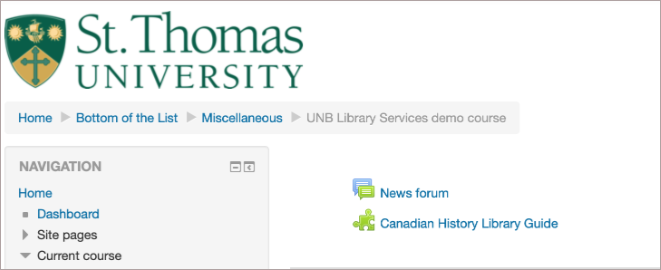
Library guides provide students with a window onto UNB Libraries resources organized by subject area. To add a guide to your Moodle course:
- Go to https://guides.lib.unb.ca/research-guides to view applicable library guides.
- Click on the desired guide, then select and copy its web address (URL).
- Go to your Moodle course and click on "Turn editing on" in the upper right corner.
- Whether at the top or tied to a specific topic or week, click on "Add an activity or resource"
- Select "External tool" among ACTIVITIES options and then click "Add".
- From the "External tool" workscreen:
- For "Activity name" choose a relevant title, for example: "Canadian History Library Guide".
- For "External tool type" leave the default option "Automatic, based on launch URL"
- For "Launch URL" paste the library guide web address (URL) you previously copied.
- For Launch container, choose "New window".
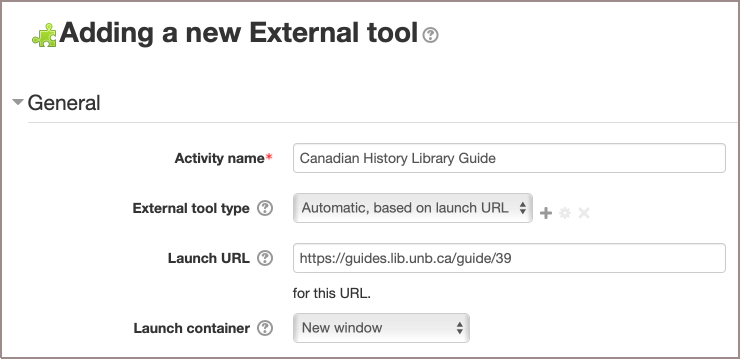
- Save and return to your course.