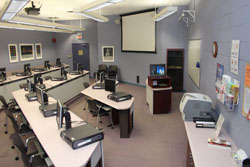
The Learning Lab is found in Room 112 on the main floor of the HIL.
The Learning Lab is equipped with an instructor's workstation and 15 user workstations. The user workstations can be arranged with single or dual seating, allowing a maximum of 32 participants.
Each user workstation is comprised of a Dell PC with a DVD drive, a sound card, USB ports, and a 22" digital flat panel monitor. Individual speakers and headphones are not supplied. Internet connectivity is provided through the UNB network, allowing access to UNB online resources. Printing is done through the student network, using the print credit system, with print jobs collected at the front of the lab.
The instructor’s workstation is attached to a ceiling-mounted LCD projector (no sound system is available currently). The remote control for the projector is mounted to the desk.
A flip chart, presentation remote, and standard overhead projector are available upon request.
The Learning Lab is open to students as a quiet study room when it is not booked. To determine availability, check the booking calendar posted next to the door and be prepared to leave 10 minutes prior to any scheduled event. We ask that the following rules be observed:
- Beverages are allowed in covered cups.
- Food is to be eaten in the Commons Café.
- Cell phones are permitted in the stairwells.
- Group study rooms are booked online – book a group study room
- No gaming is allowed.
Please see the Learning Lab Helpful Hints for more information.